

Define the system that owns each field
When two business systems exchange records, the useful question is what staff should do when their screens disagree. “System of record” means the system your organisation has chosen to maintain an authoritative version of a particular record or field. Different fields can have different owners: one system may maintain an order’s items and price while another records a delivery outcome.
This fictional East African distributor uses an order system and a delivery system. It is an illustration, not a client case. The same ownership conversation can help managers across English-speaking Africa, the UK and other markets. Confirm local data, contract, regulation, integration and service-coverage requirements for your own project.

Agree who owns each field before deciding which changes can flow between systems.
A fictional order moves between systems
Order ORD-271 is created in the order system. That system owns the order identifier, item lines and agreed price. The delivery system receives the order identifier, delivery address and items needed for fulfilment; it owns the delivery route and completion status. The team agrees whether a delivery address can flow back after an authorised correction, and which system keeps the authoritative address for later orders.
This field-by-field agreement avoids a broad and confusing claim that one entire application “owns the customer.” It also makes reverse updates explicit. If a driver records a new address, is it a one-time delivery correction or a change to the customer’s saved address? A business owner should decide before the connection is built.
Agree identifiers and exchange rules
Names are not reliable keys. Two customers can share a name, and one person’s name may be entered differently in each system. Agree a stable identifier or a matching method, what happens if there is no match or more than one match, and whether duplicates are blocked or sent for review.
Decide which fields move in each direction, what triggers an exchange, and how quickly staff need to see a change. A near-real-time update, a scheduled batch and a user-triggered exchange have different operating expectations. Do not promise permanent agreement at every moment if updates can be delayed.

Use a stable identifier and a matching rule; similar names alone do not establish a match.
Plan for duplicates, delay and failed updates
An update can arrive twice, arrive late, fail a validation rule or conflict with a newer change in the other system. For each case, define how staff can see what happened and who owns recovery. A retry may be suitable for a temporary outage; a rejected address or ambiguous identifier may need a person to correct the data first. Replaying an event should not create a second order or delivery.
For a payment-related exchange, distinguish a confirmation from a payment provider, the business’s reconciliation of that confirmation to its records, and any accounting entry approved under its process. An integration message alone should not be presented as reconciliation or a validated accounting record.
Microsoft’s Dynamics 365 integration guidance discusses record ownership, flow direction, monitoring and conflict handling for that platform’s integrations. Azure messaging guidance explains duplicate delivery and retry patterns in Microsoft’s architecture context. These are useful examples, not a claim that every system has the same controls. Choose a Dynamics integration pattern · Azure asynchronous messaging options

Test repeated, delayed and rejected updates, then name the person responsible for recovery.
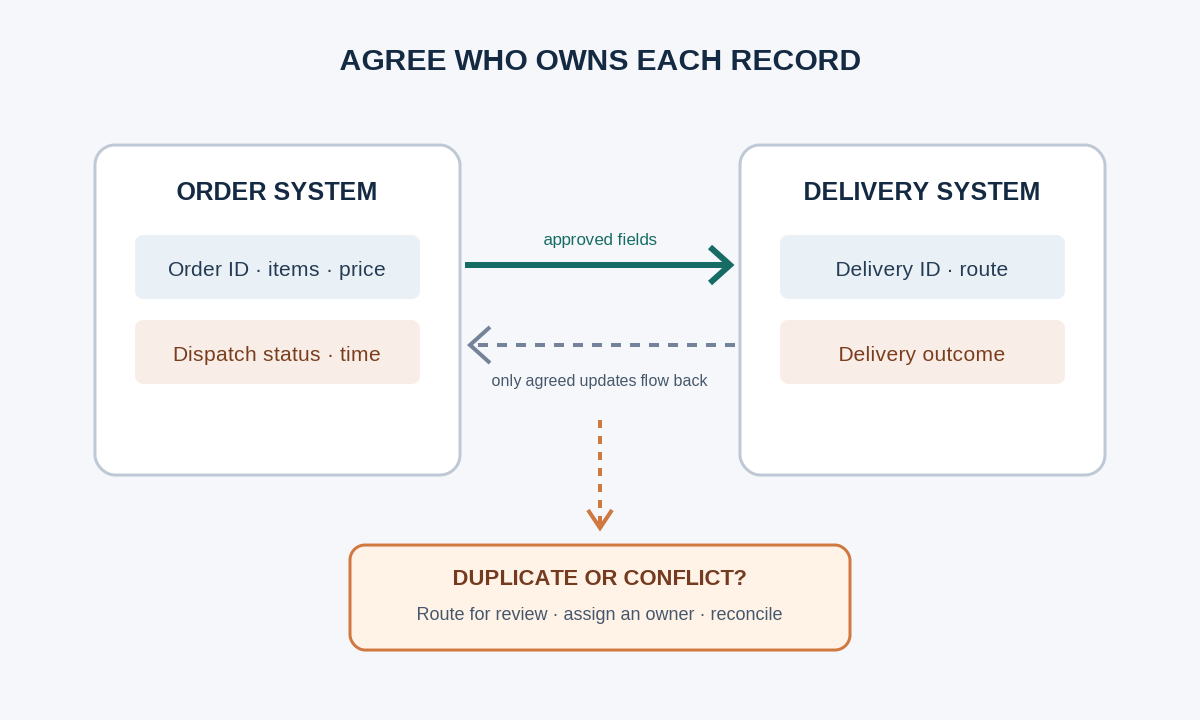
Agree who owns each field and who will resolve a duplicate or rejected update.
Integration agreement
Complete one row for each important record or field group. Use this checklist to agree the connector’s responsibilities and acceptance criteria with the implementation team.
| Decision | Agreement |
|---|---|
| Record / business meaning | ______________________________ |
| Authoritative field owner | ______________________________ |
| Identifier / matching rule | ______________________________ |
| Fields and direction of flow | ______________________________ |
| Trigger and acceptable delay | ______________________________ |
| Duplicate or conflicting update | ______________________________ |
| Failed update and retry/replay rule | ______________________________ |
| Exception location and evidence | ______________________________ |
| Business recovery owner / escalation | ______________________________ |
| Acceptance approver and date | ______________________________ |
Test a normal create and update, a repeated message, an unknown identifier, a delayed update, a temporary outage and conflicting edits. Use redacted or synthetic records. The business owner should confirm values and outcomes before the connection is accepted.
Adapt for the project and market
Across English-speaking Africa, document the business identifiers and agree what happens when connectivity interrupts an exchange. For a UK or global project, also confirm the data, contractual and regulatory questions that apply to that organisation and jurisdiction with appropriate advisers. Choose field ownership, acceptable delay and escalation contacts with the people who operate both systems.
Chwezi’s integration offer
Chwezi plans and implements connections between business systems. Agree the systems to connect, data ownership, technical scope and support arrangements for your project. Chwezi software development and integration
Before approving an integration, ask for a record-ownership and exception map. For related commissioning questions, see Buy, Configure or Build? and Find the handover that keeps failing.
Sources and scope
Microsoft’s Dynamics guidance and Azure messaging documentation support the product-scoped examples above. The agreement and test list are editorial synthesis. No claim is made about measured search demand, integration performance, a named client result, or a universal legal requirement.