

A patient who visited six months ago returns to the same clinic. Illustrative example, entirely fictional: the receptionist searches by name, finds nothing obvious, and creates a new record — not from carelessness, but because the search turned up three "John Okello" entries with no clear way to tell which, if any, is the same person. Multiply that decision across a busy reception desk for a year, and a facility ends up with a patient list that is quietly less reliable than anyone realises.
This article is about two specific administrative failure points: creating a duplicate record when a returning patient could have been matched, and losing track of where a completed registration sits in the queue once it hands over to the next role. It does not touch patient identification law, clinical prioritisation, or any claim about what a specific system automatically detects — those questions belong with local policy and a live product demonstration.
Map the Path From Arrival to Handover
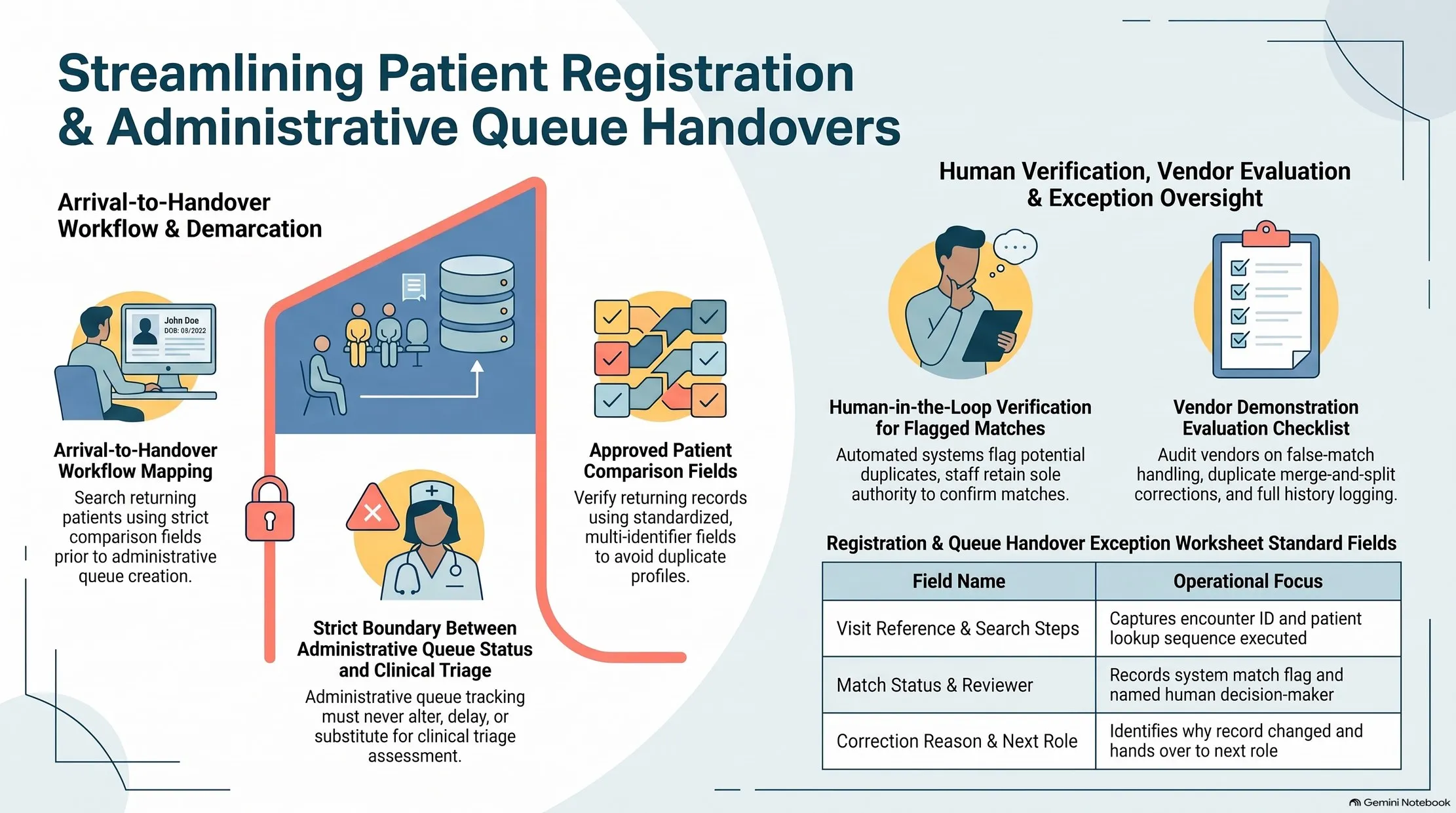
Before assessing any software, write down what actually happens between a patient walking in and a clinical role being able to see that patient is waiting:
- Arrival — how is the patient greeted and identified as new or returning?
- Registration review — what does staff check before creating or updating a record?
- Queue entry — how does a completed registration become visible to the next authorised role?
- Handover — who can see the queue, and what status changes hands control from reception to that role?
Most facilities can describe steps 1 and 2 clearly. Step 3 and 4 — the handover itself — is where visibility usually breaks down, particularly when reception and clinical staff work from different systems or different physical spaces.
Use a Fictional Returning-Patient Case
Build one fictional scenario before reviewing any system: a returning patient whose name is common enough to plausibly match an existing record. Walk it through deliberately.
Identify which approved fields staff are meant to compare before deciding whether a match exists — commonly, some combination of name, date of birth, and a facility-issued identifier. This should be a defined, agreed list, not left to individual judgement on a busy day. Different receptionists comparing different fields inconsistently is itself a source of duplicate records.
A Possible Match Is a Flag, Not a Confirmed Identity
This is the point worth stating plainly: when a system suggests that a new arrival might match an existing record, that suggestion is a flag for human review — not a confirmed identity, and not an automatic decision. Treating a system-suggested match as confirmed without a person checking it is exactly how the wrong record gets updated for the wrong patient.
The reverse failure matters just as much: dismissing a genuine match because the review step is skipped under time pressure, creating an avoidable duplicate. A sound registration process makes the review step quick enough that staff actually do it, every time, rather than routing around it.
Ask the Vendor to Demonstrate Three Specific Things
When you sit down with any patient-registration system — Medic8 included — ask for a demonstration of exactly three scenarios, using fictional data:
- A false match. The system suggests a possible duplicate that turns out, on review, to be two different people. How is that dismissal recorded?
- A duplicate correction. Two records for the same patient are identified after the fact. What happens to the history — appointments, notes, results — attached to each record during a correction?
- The history retained. After a correction, can staff still see that a correction happened, when, and by whom?
A vendor's product page can describe registration and queue features in general terms. It does not, by itself, demonstrate how false matches, corrections, and audit history actually behave in your facility's scenario — that is what the demonstration is for.
Define the Queue Handover Status — Without Touching Clinical Priority
Once a patient is registered, the queue needs a clear administrative status: waiting, called, or handed over to the next role. This article deliberately stops at that administrative boundary. Deciding who is seen next on clinical grounds is a decision for authorised clinical staff, governed by clinical protocol — not something an administrative queue status should determine or imply.
What the queue handover should make clear is narrower and still valuable: who can change the status, when a change happened, and which role the patient has been handed to next. A queue that shows "waiting" with no timestamp and no named actor leaves reception and clinical staff equally unable to answer "where is this patient right now?"
A Registration and Queue Handover Exception Sheet
| Visit reference | Search steps taken | Possible match found? | Reviewer | Correction reason | Evidence | Queue status | Next role |
|---|---|---|---|---|---|---|---|
| e.g. Visit #2026-0417 | Name + DOB + facility ID | Yes — flagged | ? | Duplicate confirmed, records merged | ? | Handed over | ? |
Use this for any visit where a match was flagged, a correction was made, or the handover status was unclear. It gives an administrator a paper trail independent of how confident any individual staff member felt at the time.
Where Medic8 Fits
Medic8, Chwezi's healthcare management system for African facilities, covers patient registration and records, clinical workflows, laboratory management, pharmacy dispensing, billing, and HMIS reporting, with offline capability built in. Its published scope describes patient registration for new and returning patients and a live-updating queue — it does not, on its own, establish duplicate-detection or merge behaviour, which is exactly why the three demonstration scenarios above matter before you rely on it.
If your reception team is working through this question, ask the Medic8 team to demonstrate a returning-patient registration and a suspected duplicate using fictional records.
Frequently Asked Questions
Does this article cover patient identification law or clinical prioritisation?
No. It covers administrative registration accuracy and queue handover visibility only. Patient identification requirements and clinical triage decisions belong with local policy and authorised clinical staff, not with an administrative worksheet.
Can a system be assumed to automatically detect and merge duplicate patient records?
Not without a demonstration. Whether a specific system flags possible duplicates, how it handles false matches, and whether it retains a correction history are things to verify directly, in your own scenario, before relying on them.
Who should be able to change a patient's queue status?
That depends on your facility's own policy, but every status change should be attributable to a named role and a timestamp — not anonymous or silent — so reception and clinical staff can always answer where a patient currently stands.
What if our facility doesn't have a formal list of approved comparison fields yet?
That is a reasonable starting point, not a failure. Agreeing that list — commonly some combination of name, date of birth, and a facility identifier — before the next system evaluation is itself useful preparation.
Two related articles are in preparation and will be linked here once published: a guide to keeping each step of a lab order-to-result handover visible without interpreting results, and a guide to testing role-based access in healthcare software with real staff scenarios.